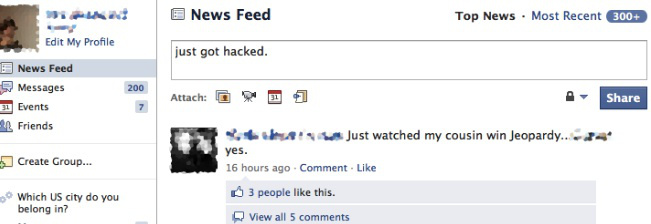
The guy sitting next to you in the coffee shop might actually be logging into your Facebook account, using the info beaming out your computer. It’s called “session hijacking” or “sidejacking” and despite it being a well-known vulnerability, most websites aren’t protecting their users from it. After a developer recently unveiled a user-friendly bit of code that makes “sidejacking” as easy a few mouse clicks, the problem is getting fresh attention.
I’ve tried it out. Within seconds I saw the sessions of everyone around me at the coffee shop, including my own Gmail session. If I wanted to, I could have changed people’s relationship statuses to “single.” I could have gotten access to information on their profile they thought was hidden, like their contact information, and if they were going to be home this weekend.
It’s a stalker’s best friend. Or an identity thief’s.
See, if you’re connected over an open, unencrpyted wifi network, it’s terribly easy for someone to copy your “cookies,” the file stored on your computer containing, among other things, your login credentials.
A lot of site will protect the initial login using “HTTPS,” which encrpyts the session but then the rest of the session continues under HTTP. It’s like your cookies are getting tossed through the air all around the coffee shop!
To protect yourself, when you’re not at home, avoid logging into websites that don’t use HTTPS.
You can also install the Firefox extension “HTTPS Everywhere,” developed by the Electronic Frontier Foundation, which defaults all your sessions to HTTPS for several major websites like Facebook, Amazon, Paypal, and Twitter.
Chrome users can use KB SSL Enforcer, which automatically detects if a website
supports SSL and automatically redirects you to it.
Commenter ovalseven recommends downloading HotspotShield (free), which encrypts your browsing with HTTPS, on any browser and OS by setting up your own VPN (works on iPhone too).
(Hat tip to Brandon Savage!)


What about connecting to wi-fi networks through mobile devices? Would someone be able to sidejack your phone if you were using a Twitter or Amazon app, versus just using Safari on your phone?
I have my mobile wifi hotspot encrypted. Is yours not?
There’s a community collective in my area that offers free public-access wi-fi and it’s a completely legitimate resource, but because it’s public access, it’s not locked down. I’m just wondering whether using wi-fi through a phone’s apps or browser would allow people to do the same thing as if you were using a computer.
I see. I misunderstood your question, and I can’t help with an answer.
Totally useless!
If you’re using unsecured wifi, you’re using unsecured wifi, whether you’re using phone, computer, or wifi enabled kindle. The bits go through the air unencrypted. There are free programs out there that allow me to watch all of your network traffic, and grab the bits that I want.
This isn’t about unsecured wifi.
This is about non secure website sniffing.
I’ve seen & played with the Firefox extension this article is about.
If the app uses http & cookies, then yes, it can be sidejacked the same, complete with user information. If it has a direct line(without http or using a proprietary protocol), then no, this situation would not apply.
Yes, it would.
You’re encrypted to others who can’t get into that WLAN (like they haven’t paid, don’t know the code, are out in the parking lot, etc.), but the guy sitting next to you (if he’s on the same WLAN) can jack you. Like the article said, one of the ways to make sure is to make sure your sessions remain encrypted (HTTPS/SSL).
FIresheep recently announced at Toorcon 12 can also steal your credentials.
Correction this article is describing Firesheep. Share and enjoy.
Shhhhh, whatever you do, don’t give out the link to…
http://codebutler.com/firesheep
oops.
All firesheep did is take a well known vulnerability and make a nice gui for it. It uses packet sniffing stuff that has been around for quite a while.
I understand that Facebook is one of the most popular sites on the Internet, but so many people here have stopped using Facebook that I think you’re doing your readers a disservice by implying in the headline that this is an issue that is specific to Facebook. You clarify in the article, but if I’m not a Facebook user I might not even read the article since it doesn’t affect me.
So many of the ‘Regulars’ have stopped using Facebook. They could be talking to the occasional/new readers. They have to draw an audience from somewhere.
You’re missing the point. This is a more widespread issue than the headline implies. It’s not just Facebook, it affects MOST websites other than financial websites and other sites where security is critical. It even affects consumerist.com. Consumerist doesn’t even HAVE a secure site.
Funny, they didn’t mention that consumerist is also susceptible to this hijack. It saves your login with a cookie and is not an encrypted page.
Oops.
You can also use Hotspot Shield for free.
http://www.anchorfree.com/downloads/hotspot-shield/
Thanks for the link. I was able to set up a VPN for my iPod Touch.
With Facebook, just manually make it https (add an “s” to the URL), and it’ll stay that way during your session. Unfortunately, chat won’t work on https, but it’s a small price to pay.
Gmail automatically uses https nowadays.
In general, don’t use a site on public WiFi if you can’t use https. As for applications, I’m not so sure.
Not gmail, but Google accounts. I check my iGoogle page and it’s plain HTTP. So, if you use something other than gmail, your session id gets sent in the clear.
Many of the other google apps (reader, news, search) don’t default to https, but you can use https with them. So if you have your bookmarks set up right, you’re good to go. But iGoogle is one of the great annoyances of my life. It would be a sweet program, if only I could use https.
It would be nice if consumerist could use https…..sigh.
It will? I just tried this and as soon as I logged in it switched back to http.
Things like this make me glad I use Facebook in Japanese. >.>
ç´ æ™´ã‚‰ã—ã„アイデア
I went to a presentation at Defcon computer security conference last summer, where a guy was showing a facebook plugin that would encrypt everything you put on facebook. The downside of the plugin was that all of your friends had to be running the same plugin to be able to read what you were posting. But it does solve the facebook problem, for the most part, without everyone having to learn Japanese.
It’s more of the idea that a lock won’t stop a dedicated thief, but it will deter an idle one. If anyone idly tries hacking into my Facebook, the sudden screen filled with Japanese characters (or plain squares, depending on the languages installed on their computer) may well change their mind.
Why focus on something trivial in the thread title like FaceBook when the real danger is logging into email, banking, or PayPal.
Because they use https:// while facebook does not.
Banking and paypal sessions use https by default, so the data going across the network is encrypted. There are always risks, but a program like firesheep isn’t so effective on them. As far as email goes, email itself is insecure. I use gmail, which uses https, so my email is encrypted between my machine and the gmail server, but the person on the other end of the conversation is probably using an email server that doesn’t encrypt things. So I have to assume that any email I send is public.
PayPal is on the list.
http://github.com/codebutler/firesheep/wiki/Handlers
Would a VPN resolve the issue?
Yes, assuming it’s properly set up.
Mine is company-provided. I just didn’t know if everything went through the VPN, if that makes sense.
Some vpn’s are set up so that everything goes through them, some are set up so that only stuff going to and from the company go through the vpn. So, YMMV.
Yup
Yes and no. If your VPN client is set to tunnel all traffic back through your VPN System, it will prevent the scenario listed above. Your traffic will be tunneled back to your company’s network, and exit out their connectivity. That being said, someone between your company’s network and facebook’s server can still sniff the traffic and still pull off the same stunt – it just wouldn’t be done via a firefox extension
Yes. Company provided is good, or self-provided. I have one for work and at home I use a router running DD-WRT with the VPN load and running OpenVPN on my laptop. The other advantage is that I receive an IP from my home network (just as if I was there in person) and can get around and download files from home, print to my home printers, and conduct the ever existing tech support VNC/RDP sessions to fix my family’s home computer problems.
Dark_15 is right, you have to setup OpenVPN correctly (or whatever VPN). There’s a full mode where you use every resource as if you were tight in the VPN’d network. that’s the one you want, so everything flows through your VPN network. Another mode is where you ALSO have access to your home, but you are still primarily going through your local WLAN network (like Starbucks etc.)
This is why I disabled automatic WiFi connection on my iPad. Google saw this coming and switched all Gmail connections to https, it was only an option before.
Actually, google switched all email to https after they got hacked in a very big public way, but yes, they were a bit ahead of everyone else.
The other point, switching the iPad (or iPhone, or computer, or whatever) to not connect automatically is a *really* good thing to do. Otherwise, you never know who your device is connecting to. Devices will automatically connect to whatever signal is the strongest. I can sit in the coffee shop running my own access point that has a stronger signal than the coffee shop’s wifi, and your iPad will connect to me instead, and I’m in the middle of your connection, which is even worse than the firesheep thing.
I think this is the exact reason why Google enabled https, China hacked accounts, not Google. If they hacked Google, enabling https on the user’s end won’t help anything. I’m sure China’s firewalls inspect all packets, so doing a session jacking is a simple task.
I hate having my cookies tossed in front of strangers.
*chuckles*
Only problem is that HTTPS Everywhere does not work properly with Firefox. The FB image server gets blocked or slowed down by the plug in. Scary stuff…
I’m using another Firefox add-on: Force-TLS. Works fine with Facebook, Twitter, YouTube, etc. Unlike HTTPS Everywhere, you can customize which sites you want using HTTPS encryption. https://addons.mozilla.org/en-US/firefox/addon/12714/
I’d like to plug my favoritest secure email company cotse.net
It’s fantastic for spam avoidance as well.
This is an ongoing issue with websites and applications alike. It’s the difference between initial authentication vs ongoing authentication. Most developers don’t understand the difference and most people don’t understand that email is not encrypted so they shouldn’t send sensitive data via email – ever.
Of course, on a public wifi network there’s a greater potential for man-in-the-middle attacks whereby a hacker merely sets up their laptop as a wifi hub and forwards your data off to the actual wifi hub with packet forwarding. That will actually eliminate all of your security, as the hacker will have your encryption keys along with your cookies and all your traffic.
Bah, the more security you add the less convenience you get and vice versa. I just wish more people would learn to err on the side of security.
I find it sort of ironic that The Consumerist is reporting this issue on their website, which is also vulnerable to sidejacking since they don’t use SSL for account logins, either.
This!!!
Clarification: Consumerist doesn’t use SSL for login AND cookies. It looks like they pass your login credentials in the clear as well, which is another huge mistake.
KB SSL Enforcer is ineffective against firesheep, as it only redirects to https after http has been used. With Chrome, users can add “–force-https” to the target line of their Chrome shortcut, but then any websites that don’t use https will not be displayed.
Firefox extension “Force-TLS” works with a whitelist/blacklist function and will keep your session in https at all times.
Another reason HTTP Strict Transport Security needs to get more prevalent.
In short, websites that uses STS only accept HTTPS connections. If you try to connect by plain HTTP, your browser automatically switches to HTTPS before it attempts to connect.
Of course, the first time you connect to the site your browser will try HTTP if that’s how you put it in. So, do the first connect from the, relative, safety of a wired connection or a known secure connection. Google Chrome helps to mediate that by preloading a list of sites that use STS. (PayPal’s one which is weird because it’s also on the list of sites that’s vulnerable to Firesheep.)
Further, this helps prevent man-in-the-middle attacks at public hotspots. If the secured connection is not a valid certificate for that site, browsers (or other user agents implementing STS) refuse to create the connection.
http://en.wikipedia.org/wiki/Strict_Transport_Security
Thanks everyone, for links to add-ins and such. I sent myself a bookmark to this article. I can’t use wifi right now because my power supply is FUBAR and I can’t get another one until payday. No laptop for me until Friday. It’s killing me!
Turn off sharing on your computer when you’re on public Wifi. People are getting their gmail accounts hacked and taken over. The hacker sends out an “I’m in trouble, need money” e-mail to your entire address book — after changing your secret question, etc., so you can’t get your e-mail account back. Your only alternative is shutting it down, and hoping none of your friends are dim enough to pay.
http://www.advicegoddess.com/archives/2010/09/29/fraud_spam.html
People make fun of me for having an AOL account — I pay maybe $10 a month for it — but that’s a small price to pay to have tech support whenever I need it and to be able to get somebody on the phone if something like this happens. I’m also the only person I know who’s had the same e-mail address since the early 90s.
Have gmail and mac.com as backups, but backups only.