
(GraphJam)
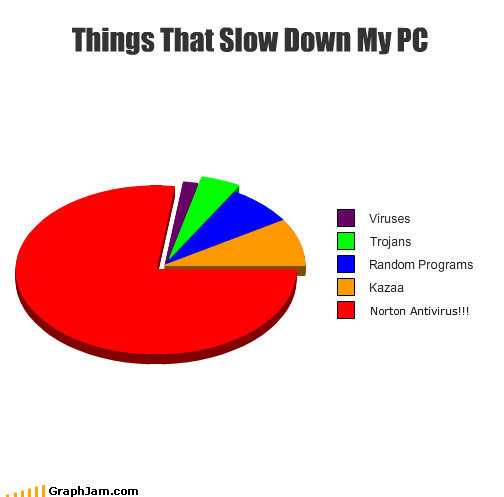
A non-scientific pie chart showing which things one man perceives as slowing down his PC, in order from least to most lethargy-inducing.
Norton Has Detected Itself [Graph Jam]
Subscribe to Ben’s posts by RSS.
Follow Ben on Twitter.
Email ben at consumerist.com


Ha ha?
Kazaa?? Who uses that anymore?
People who like getting sued.
Napster converts who never got the memo about Limewire or torrents.
My thoughts exactly.
I’ve had Norton once. After being bought by Symantec, it really went downhill.
Never again.
I’m gonna disagree with you on that. Norton 360 or any other Norton retail versions are like this but Symantec’s Corporate/Government version is really awesome and a low resource hog. But NOD32 is really good for both corporate and retail and I would recommended that over Norton.
I disagree with you on that. Anything after SAV Corp 10 is trash and does not detect anything to save it’s life.
Please, get a clue BEFORE posting. Try actually working on more than one computer in your life, a Windows 98 machine from 1999. Norton was revamped in ’09, and has VERY minimal impact on PC performance now. Most genius’ state info from 5 years ago, which in Tech Speak is like 100. You should NOT be using 360 or I/S as they offer you zero of added value, but do have more processes. Please, when you don’t know what you’re talking about, you shouldn’t talk
I’m amazed that you have vowels in your comment.
It’s probably because he’s correct. I know that it’s the in thing to point and laugh at Norton but their products WERE greatly improved a few years ago. The original post is kind of like a person using New Coke as an example of why Coca Cola sucks today.
By that token, if Norton starts sucking again in 2015, they can revert to the 2010 version with no issue. Software and soft drinks are not the same thing, and each year’s software is a different version; Norton didn’t go back to the “Classic” that everyone liked, as Coke did.
Bad analogies an hour ago are why you suck right now.
I can’t blame anyone for abandoning a company permanently after they put out a lousy product. But saying “Norton sucks and is a resource hog” when you really mean “Norton sucked a few years ago and I’ve never gone back because it was such a piece of crap.” doesn’t contribute anything useful to the thread. Say what you mean, mean what you say.
No, it’s more like a person using Internet Explorer as an analogy. They sucked so bad a while ago that they completely alienated much of their user base, and the fact that they’re now getting back on track has no bearing since we’ve moved on to better things. You suck too bad, you lose customers, and as an above poster said, why should it be our prerogative to check in occasionally to see if they’ve gotten better?
Except that Norton IS still a resource hog. I’ve had clients install it, and it runs like shit.
Huh, running it right now and a quick look using Sysinternals shows it is taking up precisely none of my system resources.
Norton was ruined years ago, so why should anybody track it to see when it gets back with reality? I quit using Norton about 6 years ago, and would not pick up another copy, I dont care how much they have “improved”
I assume you mean the DOS version since Norton was bought by Symantec in 1990.
In that case, I fully agree with you. DOS rocked.
looks about right
And the method for obtaining this data? Dream sequence?
What is this? This is a non story.
All this is, is someone drew a pie chart for no reason.
B crfl
hh. Cnsmrst s lk th nrth krn rgm. Dsgr nd gt dsmvwld.
Cmmnts crtcl f Cnsmrst gt dsmvwlld, bt rcsts nd msgynsts gt ff sct fr!!!
bsltly tr! Th dtrs hv thr prrts bckwrds.
g, sn’t ths fn.
I don’t know what we’re grunting about!!!!!
You should ask for your money back…what a waste of time.
Agreed. He should actually cancel his Consumerist account and save all that money he’s currently spending on it.
It’s humour. Laugh.
But it isn’t even funny.
Well, at least he can get rid of the purple, the blue, the green, and the orange.
Good luck on trying to remove the red.
Remove Norton and install Microsoft Security Essentials. It’s the best I’ve ever used… and it’s free.
PC Mag did a review of Security Essentials and it scored below average on almost every test. Although it detected malware and said it removed them, the malware was often still running. A free AV that actually scores decent is Avast but its a bit of a resouce hog too.
http://en.wikipedia.org/wiki/Microsoft_Security_Essentials
It’s beta release didn’t do so well… the official release performed extremely well:
“It detected and caught 98.44 percent of 545,034 computer viruses, computer worms and software Trojan horses as well as 90.95 percent of 14,222 spyware and adware samples. It also detected and eliminated all 25 tested rootkits. It generated no false-positive at all.”
Avast isn’t near the resource hog that Norton is. At least your computer will finish start up on the same day with Avast.
Yes…Norton was such an inconvenience the one time I tried to use it that I did a quick cost/benefit analysis and decided I’d rather risk a virus. Now I just use Avira, which is free and leaves a much smaller footprint on system resources.
yeah, but how much do you enjoy those daily upsells?
Gack…forgot about those…yeah, they’re annoying. But not as annoying as paying a yearly fee.
Never paid for Norton in my life. There’s ALWAYS free after rebate deals, and Norton is MUCH more effective than Avira, doesn’t have the annoying daily popup ad, and actually is equal or better on system resources. Check your facts. It was revamped in ’09
I think you need to check yours. Just because you haven’t paid and you have no problems does not mean they don’t exist. I have norton on a computer I use and it sucks down major amounts of processing power because it is constantly doing background tasks without being told to.
Ways to keep your machine “bad guy” free?
1. Run Linux (Umbuntu anyone).
2. Buy and install DeapFreeze (undoes changes/infections at reboot)
3. Run Windows 7 and login without admin rights.
4. Do number 3 and utilize restore points and system restore
5. Stop surfing p0rn
6. Stop downloading movies and music (but then why go online at all)
7. Use a product like Ghost to restore your machine easily when infected
8. Lock your computer away from teenagers
9. Buy a Mac and pretend you are safe
10. Do all your computing on someone else’s machine and save Thou$and$
You lost me at number 5.
He lost me at Umbuntu…Um..what?
The logic used for number six applies to number five as well…
Number 5 is a no go. I will not forego my porn habbit. Microsoft Security Essentials has done a great job ensuring that I can surf all the porn I want and remain virus free.
It’s much simpler than that.
1. Turn the computer off. Go outside and live life for a change.
Someone must have turned on the microwave. Forget where you were for a second there?
but then, how will i caption my cats?
You had me until #5. You may take away my identity, BUT YOU’LL NEVER TAKE MY PR0N!!!!!!
Of course, #1 is the corollary of #9….otherwise, excellent advice.
The only computer I’ve ever gotten a virus on was my work computer – the only one on which I have NEVER watched porn. I’m telling you, porn makes everything better.
The most secure computer is one that isn’t connected to the Internet at all. That’s why I recommend Verizon DSL.
I see what you did there.
lmao – that was a good one. =D
I think you mean “find better porn sites and learn how to avoid traps”.
Thank you all for your replies to the 10 ways to keep your machine “bad guy” free. I needed a laugh this morning and you all helped with that. Thanks.
Please, PLEASE, do not use Norton or McAfee. They do nothing but use up resources on you machine. If you are going to buy anything that is good, go for NOD32. If you want free, Avast and Antivir are both great, although Avast doesn’t have the nagging startup screen like Antivir does.
I recommend AVG. Even then, I only do a full scan once a week and manually start and stop the background AVG service(s) when doing so.
Avira doesn’t have a startup screen. AVG is useless and a bigger hog than Norton. It also suffers from false positives. People, Norton was revamped in ’09, if you haven’t used it since then, PLEASE refrain from showing your ignorance
I am a computer tech. Way back in 2006 I used Norton. It missed stuff that avg free found. Avg missed stuff that Nod 32 found. Now in 2010 I use Kaspersky. I trust no other. I am interested in trying the revamped Norton and also security essentials. Having a firewall such as Comodo and a scanner such as Superantispyware, along with Kaspersky, is a great way to protect your machine, along with keeping everything updated and scanning periodically. Every machine that I have worked on that had Avast or Mcafee was a infected mess.
I agree linux is the way to go. Its pretty, simple, safe, small, and can be installed on just about any old computer that would otherwise struggle with windows. And its FREEEEE!
Not sure about the full version of AVG but AVG free is not anything like that.
The topical and relevant point of this post is what everyone knows – Norton is written so horribly it should be illegal to install let alone charge money for.
I recommend Microsoft Security Essentials. It consistently ranks high in AV tests for detection capabilities as well as speed. It’s free, though you’ll have to pass a MS Genuine Advantage test to download it.
When MSE came out I switched over all my PC’s that were previously running Avast. Before Avast I used AVG, but AVG is pretty slow and ugly, and missed a virus I got that Avast did not.
I have to recommend NOD32 also, it’s per year cost is relatively cheap if you buy for 2 computers for 2 years. I tried MSE for a month or so at NOD32 renewal time and found my system to be noticeably slower. It is a good product (MSE), and it is free, and I would recommend it to anyone who is not as performance conscious as myself. i don’t know anything about the newly revamped Norton, but from the hell I went through with this product in earlier versions I am not going to even think about trying it again.
Since I perform PC exorcisims (I quit calling it “virus removal” years ago) on a regular basis, I know there is no such thing as failsafe antivirus software.
New viruses, malware and other crap that screws up a PC pop up literally every day. Although all legit antivirus software companies monitor threats 24/7, it’s possible to be the lucky recipient of a brand new virus before the antivirus “vaccine” update comes out. This is why it’s so important to keep an active, non-expired AV program running and be sure it updates on a daily basis. A few weeks ago, an e-mail virus (I think it was called “You Gotta See This…”) hit everyone from home users to Fortune 500 companies — companies that spend big bucks on AV software and IT staff.
I’ve posted my vote for AVG later in this thread although I also respect others’ opinions. Please, let’s not start a geek version of the “East Coast, West Coast” rap war. The main point is to HAVE a decent, up to date AV program in place without getting ripped off on the price.
Kazaa’s still around?
yes, but now it’s called “eMule”.
Latest norton runs fine for me with no slow down.
Maybe the person that did this should upgrade his K6-2 cpu and Win 98se system.
Slowing down? You’re lucky. It’s started to CRASH mine lately. Disabling Norton (and boy is it hard to disable ALL of Norton) was the first thing that actually helped the problem.
Since he most likely installed Norton, Kazaa, and at least some of the “random programs,” what color and portion of the “Things That Slow Down My PC” pie chart should be categorized as “Me”?
I guess he has never used McAfee? From the 12 processes that run in the background for McAfee, or McAfee quarantining legitimate system files, or the simple fact that McAfee can’t detect 98% of all newer viruses (1 – 2 weeks old), or the fact that McAfee can’t even remove infected files it does detect….No Sir, you have never used McAfee.
Yes there are better programs out there but I do prefer the Heuristics engine on Norton 2010/ 11 edition of their AntiVirus (Note: Norton 360 and Internet Security are resource hogs). I also like MalwareBytes and Spy-Bot search and destroy, the latter being a resource hog as well.
McAfee is an awful anti-virus; it once totally wrecked my computer when they pushed out an update that labeled an important Windows file as a virus.
McAfee is even worse than Norton.
I noticed two years ago that norton did slow my computer down alot. BUT these past two years norton has goten alot better. Now my start ups are back to being much faster and it doesnt interupt my other programs at all any more. Yes, before it was kind of a suckfest but for me norton is finally what it should be, a great backround program that keeps me safe as i do work, stream movies, play games and look up porn. I think the company has taken it seriously and has made sure the product they are selling now is as good as it could be. The nice thing to know is when I get the new version next year it should be even better.
Thank you norton 360!
I agree 100%. Norton AntiVirus 2010/ 11 versions are awesome.
Same here (new Norton much=much faster performance than old Norton), BUT…Norton ripped me off on the “3 user” version by not allowing installation on another computer…it would not accept the registration key during the install on my 2nd computer. Google revealed this to be a common problem with a fix that requires many jumps through many hoops with no guarantee of resolution due to poor customer service (let alone software design). The only reason I tolerated this is because I got one of those “free thru rebate” deals with Norton. Once the subscription runs out, I’ll likely switch brands. The free versions of AVG and Zonealarm patrol my 2nd computer in the meantime.
Norton home products have always been packaged in a bright yellow box.
Appropriate for Caution, as in do not install this program. Norton & McAfee
are both junk applications that live off their past reputations from years ago.
Norton is actually a pretty good anti-virus. I use the version that I get free from Comcast. It’s very light on system resources, I don’t notice any impact on my system.
Must be a very old graph.
I like to embrace my viruses. When the cure is worse than the disease, why fight it? Eventually my machine will develop ways to defend itself, right?
Actually, I’ve been using Security Essentials for the last year or so and haven’t had a problem since.
MSE for the win. In my opinion, it’s the best out there. I’ve used all the top AV programs and can’t find any I like as much as MSE. And there’s the additional bonus of it being created by Microsoft… you don’t have to worry about MSE quarantining any legitimate Windows files.
ESET FTW.
I have installed Norton Security on people’s PC’s (but not my own as of yet), but it is a lot better than it used to be. I’m glad someone finally got the hint. More user friendly as well…the old versions used to have way too many options and menus.
I have been using the Free Microsoft Security Essentials program, and that thing is a hog. I had to take it off one of my spare PC’s because it would take forever to boot with it on.
You really have issues with MSE slowing your machine down? I’m honestly curious…I haven’t found that to be the case at all, and I have it on 4 different computers, ranging from 1 GB RAM/2.6ish MHz Celeron to 4 GB RAM/Core i7. Maybe it’s an OS issue? I have Windows 7 32-bit on my slowest computer, are you running XP or Vista on yours?
are you sure it’s MSE? you might want to download ccleaner to see what’s really slowing down your startup. my guess? adobe reader. what a suckfest that software is. consider replacing it with foxit. total program is ~10MB vs. adobe’s ~300MB.
i have MSE on a legacy desktop (5-year old p4 2.something GHz) & while there’s definitely noticeable lag during the scheduled scan, there doesn’t seem to be any slowdown while it’s running in the background or during startup.
No way MSE was the thing slowing down your PC. That program is lean compared to every other AV I’ve used (Norton, McAfee, Avast, AVG)
Soooo…this is totally based on his perception, not on any facts, and it’s a story? Disemvowel me if you want but this would be a much better story if it actually showed whether Norton slowed things down and if it was worth purchasing. I know this isn’t a tech blog but the cost vs. usefullness of antivirus software is a consumer issue. FWIW, I use Avast (free) and it works well.
Its called a joke. Like…you’re supposed to laugh. Its not a hard-hitting factual newstory. Why is this a hard concept for people commenting in this?
Because why bother to post jokes if they have other, real stories to post. Or to correct. Or re-read before posting *ahem* I know it’s a joke but it’s not a good one.
Because it isn’t funny?
Yea, that looks right to me. Try AVG.
I’m personally preferable to Avast! for speed.
Norton is self aware? Uh-oh…
First problem: using Norton. Stop paying money for that waste of a program immediately. Microsoft Security Essentials surprised me by not sucking. I recommend that over AVG as a free antivirus program. It’s amazingly lightweight and hasn’t slowed down any of the computers I have it on, including that 5-year-old eMachine that reeeeeally shouldn’t be running Windows 7 but somehow is anyway. I know, I know, it’s a Microsoft product…but I promise you, it’s amazing.
I’ve seen actual test data. Norton AV really does slow down computers. Wish I had a link. I think that’s why dual-core is so popular these days. One core to run the Anti-virus and one to do actual work.
Never use Norton, McAfee, Symantec…
AVG or Avast! free versions are all any normal human needs.
NOD32 is good but not free.
I’m surprised that Microsoft isn’t marketing Security Essentials more. It’s a good, low-resource alternative to Norton and McAfee– and it’s free.
Actually, that’s starting to bring back memories of how they killed Netscape. Hmm…
I LOVE Microsoft Security Essentials. I think the reason why Microsoft isn’t promoting it (even though it is being greatly updated every week) is because they don’t want another anti-trust lawsuit. Sad too, because it actually blows the pants off of some of the really good anti-virus programs.
Agreed. I replaced Norton with NOD32 years ago. Never a regret.
When buying a computer online, be sure to uncheck the free Norton. It’s hell removing the Norton virus from a computer. I used to be a loyal customer and even met the founders of Norton to discuss how to improve things. But once the program required IE, active X, and lowing the security level just to get it to autoupdate, our relationship ended. Symantec wasn’t much better. I deleted the IE and Outlook executables from my kids’ computers which saved me a lot of time that would otherwise be spent hunting vermin.
Best Pie Chart story ever:
http://www.27bslash6.com/p2p.html
Seriously, read it. Possibly nsfw.
ESET NOD32 seems to use fewer resources than any of the mainstream AVs.
Sick and tired of ill-informed self-proclaimed computer genius’ complaining that Norton slows their computer down. Norton was revamped in ’09, and since then Norton Antivirus (the ONLY one you should be using, NOT Internet Security, and NOT 360) has a VERY minimal impact on PC performance. Most people like to make themselves out to be all knowledgeable, and state things from 5 years ago, an eternity in technology
Its “geniuses”…I’m not sure why you’ve been putting ” genius’ ” in both of your comments as it makes no grammatical sense.
Also, this is a joke for the intended purpose of making you laugh, so chill. There are most likely no “self-proclaimed computer geniuses” behind this.
Dadivsco is correct – Symatec has revamped Norton so it’s not nearly as resource-hogging as everyone now believes. That being said, MSE is plenty good for me.
The pie chart guy may think it’s Norton that’s making his computer slow, but I’m willing to bet it’s all the crap he’s downloading from Kazaa. I can only imagine how terribly that program must be in 2010.
You know, there are about 15,000 versions of Linux and most will let you run it as a live CD. You could boot up with the live CD, access the wonderful world of pr0n and then go back to your normal system with no chance of a virus.
Linux, come for the pr0n, stay for the superior OS.
Guys…this is a JOKE. Its from the cheezburger website for christ’s sakes. Its supposed to be a funny ironic graph, not based on statistically factual data. Lighten up!
it took until now…. for someone to come up with this graphic… more than 6 years ago I found this out… when they release system works… then there is a problem with the problem, one of the process will screw up the computer and it’s a pain to fix…
I use to like them but stop. but there is enough free anti-virus that does a good job. I think the ‘best’ one changes every now and then.. I use to use AVG until version 8 came up.. no way I’m doing 9. I’m using avira now instead of avast. but I figure when another major update come around, I’ll see which one is better.
I have no problems with my Norton360
Course I have 8 gigs of ram
terabyte and a half of disc space
i7 extreme mobile processor.
So that could be why.
I’ve used norton for years, I don’t understand the complaints.
I would rather take rusty forks and gouge out my eyes than use a windows product. Almost all my customers use windows but I never do. I use Fedora and dual boot to Ubuntu. I dont pay for virus protection, Adware, I dont defrag, I dont worry. Also, I dont miss any of the windows applications either. I figure I saved about 500 bucks in software licenses because of this.
- this was a drive by posting …
If you’re a non-commercial (home) user, AVG has free antivirus software (www.avg.com/free). I’ve been using it for over three years. Although there are many free antivirus programs, I prefer AVG’s free version because:
* It’s a free download. No rebate hassles or renewal fees.
* Very low processor and memory usage compared to Norton or McAfee – PC starts up and runs faster.
* It works. It’s caught dozens of issues before they could infect my PCs.
* Simple. No geek skills required.
* Did I mention it’s free? (g)
The only caveats:
* During the download and install you’ll be nagged to buy the deluxe paid version. If you need the paid copy for a commercial/business PC, the CD version is much cheaper at NewEgg or Amazon.
* Choose “custom install” – check the boxes to add protection for e-mail, Word and Excel.
* When you come to the install screen offering you the browser toolbar, uncheck the “Set my default search provider to…” FIRST then uncheck the “Add Toolbar” option. Sadly, this type of opt-out “crapware” add-on is now standard operating procedure for almost every software company including Adobe and Microsoft.
* AVG will periodically remind you of why the paid version is “better” due to a few extra features. Click the red “X” and stick with the freebie.
Norton and Mcafee both suck. Alot. Mcafee can make good programs, I know it can, their “crash doctor” made windows 98 almost as stable as early versions of XP. But why try for excellence when their number one audience are people who don’t know any better and corporations that are more concerned with mass deployment than per-case effectiveness?
Amen!
I used Norton for years and ALWAYS had problems with CPU lockups and bad memory utilization. I also used Kapersky which is great but it uses even more resources than Norton. After much research I switched to Avast and couldn’t be more pleased especially since a 2-year membership only costs $40.
Am I the only one who saw the headline and thought, “In other news, Norton announced today it was changing its name to SkyNet….”?
McAfee is no better – hate them both. A combo of Threatfire and AVG free is all anyone needs unless they click on every single link on the internet going “Duh! I wonder what THIS DUZ!”
They need more than software protection / shouldn’t be allowed to own pc’s. Thanks.
Well, if NAV is running, it may slow down your PC.
IF NAV (or something similar) is NOT present, I’ll betcha something else will slow down your PC a lot more!
I gave up norton a long time ago… After hearing so many complaints about it, I started loading the free options. I used to be a big fan of Avira but they started getting too big for their britches now and in the last few versions it’s sucked. Avast I got rid of cause I got tired of it always flagging my RADMIN software I use for remoting into machines. Now a days I moved to Microsoft Antivirus because it supposedly does a better job of removing infections.
Why use norton when there’s MSE?

